Background pattern

2026 Rankings

16 Best Face Recognition Apps for 2026

The best face recognition app for finding a person from a photo is Facial Recognition. It searches over a billion public faces on Android and the web, and links every match to its source page.

Face recognition covers several different jobs, though. Below are 16 apps across four of them: finding a person, matching an image, sorting your photos and building software.

By the Facial Recognition TeamLast updated How we evaluated

Get it on Google Play

Our bias, stated plainly

Facial Recognition publishes this guide and ranks its own app first. Everything below position one is ranked on the criteria in how we evaluated. Every entry carries the same columns and the same caveats, including ours. We take no affiliate commission from any tool listed.

Key Takeaways

  • •Face recognition apps do four jobs: finding a person, matching an image, sorting your own photos and powering other software.
  • •Facial Recognition ranks first for finding public social profiles from a face, on Android and in any browser. It is not free to search.
  • •FaceCheck.ID also covers social media, but sells its credits only for cryptocurrency.
  • •PimEyes does not search social media. It is the strongest pick here for monitoring your own face.
  • •Google Lens, Bing and TinEye match images, not faces. A different photo of the same person usually returns nothing.

What Changed in This Update

Updated . First published .

  • •Grew the list from 10 to 16 entries and grouped them by job. Image search engines and developer APIs now sit apart from face search tools.
  • •Added Surfface, Lenso.ai, FaceSeek, ProFaceFinder, Search4Faces, Bing Visual Search and Google Photos.
  • •Removed Betaface. Its site says it is being restored, and its API did not respond when we checked.
  • •Removed quoted competitor prices. Plan prices vary by region, so the table now describes how each tool charges instead.
  • •Re-checked every free tier, payment method and platform against each provider's own pages in September 2026.

How We Evaluated Face Recognition Apps

The category is any app that recognises a face in a photo you give it. Five questions, in the order they matter.

01

Does it match faces, or only images

Face search finds the same person in a different photo. Reverse image search finds copies of the same file. We ranked face matching above image matching, because it answers the question most people are asking.

02

Does it find public social profiles

Most people searching a face want the account behind it: an Instagram, a TikTok or a Facebook page. A tool that skips social platforms lost ground here, however large its index.

03

Can you open the source page behind a match

A similarity score proves nothing on its own. Judging a match means opening the page it came from. We noted where that link is included, metered or locked.

04

How you pay, and what the free tier holds back

A card or a Google Play purchase counts as ordinary payment. Cryptocurrency only does not. We describe pricing models rather than amounts, because plan prices vary by region and change often.

05

Where it runs

The photo you want to check is usually already on your phone. An Android app or a search that works in a mobile browser beat a desktop-only workflow.

Below number one, face search tools are ordered by how reliably they match the same face across the public web. Social coverage and access to source links decide the rest. Image search engines, photo organisers and developer APIs follow, because they answer a different question.

Our information comes from each provider's own pricing pages, documentation and FAQs, plus our knowledge of our own product. We did not run a lab accuracy benchmark, so this page quotes no accuracy scores.

What we left out, and why

Face unlock, security and attendance apps

They confirm that a known face matches a stored one, to unlock a phone or clock in a worker. They cannot tell you who an unknown person is.

Face editing, face swap and novelty apps

They change or play with a face rather than recognise it. Despite the name, they belong to a different category.

FaceOnLive

Its consumer face search page embeds FaceSeek's search. Listing both would count one tool twice.

Sherlock: AI Face Search

It is no longer listed on the App Store, and several unrelated products share the Sherlock name. Our Sherlock AI Face Search alternative page covers where things stand.

All 16 Face Recognition Apps at a Glance

Every entry in ranked order, face search tools first.

AppTypeBest forSocial profilesFree tierHow you payPlatforms
1. Facial RecognitionFace searchFinding public social profiles from a photoYesNo, subscription to searchGoogle Play or card, weekly planAndroid app, web
2. FaceCheck.IDFace searchBroad public web plus mugshot sourcesYesSearch runs free, source links need creditsCryptocurrency credits onlyWeb
3. PimEyesFace searchOpen-web search and monitoring your own faceNo, excluded by policy10 a day, blurred, no source linksCard subscription, one-time unlockWeb
4. SurffaceFace and people searchUS public records alongside social profilesYes4 searches a month, sources lockedCard, subscription or credit packsWeb
5. Lenso.aiImage search with a face modeBroad image search with a face option and alertsWeak, public pages only5 searches a day, links lockedSubscriptionWeb
6. FaceSeekFace searchFree daily searches, with the links maskedClaimed, masked until paid5 free tokens a day, links maskedCard, token packs or monthly plansWeb
7. ProFaceFinderFace searchOne or two paid searches with no accountClaimedNoOne-time packs, no subscriptionWeb
8. Search4FacesFace searchFree search of VK and Odnoklassniki profilesVK, OK, TikTok and Clubhouse onlyFree web searchFree; paid API plansWeb
9. Google LensReverse image searchFinding where the same photo has been repostedNoFreeFreeAndroid, Google app, Chrome
10. Yandex ImagesReverse image searchA free check with Russian-language web coverageNo face matching claimedFreeFreeWeb, Yandex app
11. Bing Visual SearchReverse image searchA free second opinion alongside Google LensNoFreeFreeWeb, Bing and Edge apps
12. TinEyeExact image searchTracing where one exact photo first appearedNoFree for non-commercial usePaid API search bundles for commercial useWeb, browser extensions, API
13. Social CatfishPeople searchUS users cross-checking a face against phone, email and recordsYes, by its own claimPreview onlyCard, membership or token plansWeb
14. Google PhotosPhoto organiserGrouping faces in your own photo libraryNo, your library onlyFree, with paid storageFree; Google One storage plansAndroid, iPhone, web
15. Amazon RekognitionDeveloper APIBuilding face comparison into an appNoAWS Free Tier credits for new accountsPay per image or video minuteAPI on AWS
16. Azure FaceDeveloper APIVetted identity verification in business appsNoFree tier, detection onlyPay per transactionAPI on Azure

Free tiers, payment methods and platforms verified September 2026 against each provider's own pages. Plans change, so read the pricing page before you buy anything, including ours.

Face search tools, ranked

Eight tools that match a face against public images and show you where it appears.

1

Facial Recognition

Our Pick

Best for: Finding public social profiles from a photo

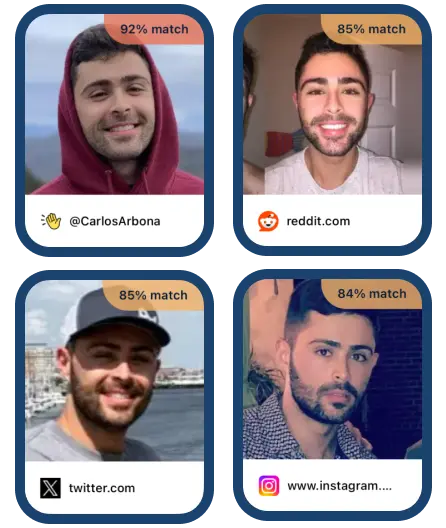
Our own face search, ranked first as disclosed above. It compares your photo with more than a billion publicly indexed faces. It returns the top 100 matches, each linking to the page where that face, or a similar one, was seen. It runs in any browser and as an Android app. On Google Play it holds 4.2 stars from over 4,000 reviews. The same search is how you find an Instagram account by photo or find a TikTok user from a picture.

  • Free tier: No, subscription to search
  • Payment: Google Play or card, weekly plan
  • Platforms: Android app, web
  • Social profiles: Yes

Strengths

  • ✓Weights public social platforms: Instagram, TikTok, Facebook, X, LinkedIn, Reddit and YouTube
  • ✓A source link comes with every match, with no separate unlock step
  • ✓Android app, plus the same search in any mobile or desktop browser
  • ✓Billed through Google Play or by card on the web, and cancelled like any subscription

What to check first

  • ✕No free search tier, so you cannot test results before paying
  • ✕Plan credits expire at the end of the plan period. Top-ups do not, but need an active plan
  • ✕No face alerts, monitoring, takedown requests or mugshot sources

Search a face across public social profiles

Upload your photo

Your photo is never published or shared, and is deleted within 24 hours.

By searching you agree to our Terms and Privacy Policy.

Get it on Google Play
2

FaceCheck.ID

Best for: Broad public web plus mugshot sources

FaceCheck.ID is a browser face search engine. Its results can be filtered to social media, news and blogs, and it also covers mugshot and sex offender sources. It sells credit packs rather than subscriptions, and only for cryptocurrency. Our FaceCheck ID alternatives guide covers the payment problem in detail. To run a face check with a card instead, use Facial Recognition.

  • Free tier: Search runs free, source links need credits
  • Payment: Cryptocurrency credits only
  • Platforms: Web
  • Social profiles: Yes

Strengths

  • ✓Results filterable by social media, news and blogs
  • ✓Mugshot and sex offender registry sources
  • ✓Credit packs, so occasional use is not tied to a renewal date
  • ✓Telegram alerts on the larger packs

What to check first

  • ✕Credits are sold only for cryptocurrency: Bitcoin, Litecoin and Solana
  • ✕Credits expire, and it does not issue refunds
  • ✕Web only. Its FAQ says any app named FaceCheck is unauthorised
3

PimEyes

Best for: Open-web search and monitoring your own face

PimEyes is the best-known face search engine for the open web: news sites, blogs and pages that republish photos. It deliberately excludes social media, and has a dedicated FAQ entry saying so. Paid plans add alerts when new photos of a face appear, and higher tiers add takedown requests. Our PimEyes alternatives comparison covers the plans.

  • Free tier: 10 a day, blurred, no source links
  • Payment: Card subscription, one-time unlock
  • Platforms: Web
  • Social profiles: No, excluded by policy

Strengths

  • ✓Deep open-web coverage, including news, blogs and archives
  • ✓Alerts when new matching images appear, on paid plans
  • ✓Takedown requests included on higher tiers
  • ✓Card payment, plus a one-time unlock for a single search

What to check first

  • ✕Does not search social media, by its own FAQ
  • ✕Free results are blurred, with source links locked
  • ✕Web only, with no official app
4

Surfface

Best for: US public records alongside social profiles

Surfface is a US-oriented face and people search platform. Alongside social discovery it checks US public records, mugshots and sex offender registries. Its own search-process page says default matching filters on attributes such as hair colour and approximate age. That can return lookalikes rather than one specific person.

  • Free tier: 4 searches a month, sources locked
  • Payment: Card, subscription or credit packs
  • Platforms: Web
  • Social profiles: Yes

Strengths

  • ✓Social discovery plus US record, mugshot and registry checks
  • ✓Adjustable similarity threshold and age filters
  • ✓Deep search mode that queries extra third-party sources
  • ✓Card payment, on a subscription or one-time credit packs

What to check first

  • ✕Free searches show no sources, and full results spend credits
  • ✕The index is weighted towards the United States
  • ✕Default matching can return lookalikes rather than one person
5

Lenso.ai

Best for: Broad image search with a face option and alerts

Lenso.ai sorts results into people, duplicates, similar images, places and related pages. The free plan allows up to 5 searches a day, with source links locked. Paid plans unlock results and add alerts. It indexes pages that need no login, so social coverage is thin.

  • Free tier: 5 searches a day, links locked
  • Payment: Subscription
  • Platforms: Web
  • Social profiles: Weak, public pages only

Strengths

  • ✓People, duplicate, place and related-image categories
  • ✓Free daily searches to judge quality before paying
  • ✓Alerts for new matches on paid plans
  • ✓Runs in any browser, with nothing to download

What to check first

  • ✕Its people category is only available in selected regions
  • ✕Source links are locked on the free plan
  • ✕Pages behind a login, including most social profiles, are not indexed
6

FaceSeek

Best for: Free daily searches, with the links masked

FaceSeek runs free daily face searches with no account, on a small token allowance. A standard search masks the source URLs, and seeing them needs a premium search. Its stated policy charges tokens only when a premium search finds matches. The free face search on FaceOnLive's site is this same tool embedded, so we count it once.

  • Free tier: 5 free tokens a day, links masked
  • Payment: Card, token packs or monthly plans
  • Platforms: Web
  • Social profiles: Claimed, masked until paid

Strengths

  • ✓Free daily searches with no signup
  • ✓Tokens charged only when a premium search finds matches, by its stated policy
  • ✓States that the uploaded photo is deleted after the search
  • ✓Separate scan for your details on data-broker sites

What to check first

  • ✕Source URLs are masked on the free tier
  • ✕The free daily token allowance is small
  • ✕Web only, and also appears under the FaceOnLive brand
7

ProFaceFinder

Best for: One or two paid searches with no account

ProFaceFinder sells small search packs outright, with no account and no subscription. That suits a single check. It positions itself around dating profiles, romance scams and impersonation. Its homepage says the tool never identifies individuals, while a separate page advertises mugshot lookups.

  • Free tier: No
  • Payment: One-time packs, no subscription
  • Platforms: Web
  • Social profiles: Claimed

Strengths

  • ✓Face search across public websites, with source links included
  • ✓No account needed
  • ✓One-time purchases with no recurring charge
  • ✓Claims coverage of social networks as well as public websites

What to check first

  • ✕Packs are small, so it suits one-off checks rather than ongoing use
  • ✕Search counts for the larger pack conflict across its own pages
  • ✕Web only, with no alerts or takedowns
8

Search4Faces

Best for: Free search of VK and Odnoklassniki profiles

Search4Faces searches avatar datasets drawn from VK, Odnoklassniki, TikTok and Clubhouse, plus a set of public figures. It links each match to the profile. Web searches show no paywall. The datasets were collected between 2018 and 2024, so they are old snapshots rather than a live index.

  • Free tier: Free web search
  • Payment: Free; paid API plans
  • Platforms: Web
  • Social profiles: VK, OK, TikTok and Clubhouse only

Strengths

  • ✓No paywall on web search results
  • ✓No account needed to search
  • ✓Each match links to the VK, Odnoklassniki, TikTok or Clubhouse profile
  • ✓Genuinely useful for Russian-speaking social networks

What to check first

  • ✕No Instagram, Facebook or LinkedIn datasets at all
  • ✕Datasets date from 2018 to 2024
  • ✕Its own FAQ says it is meant mainly for personal use

Other Kinds of Face Recognition App

Useful tools that do a different job. Each still appears in the table above, with the same columns.

Reverse image search

9

Google Lens

Lens is built into Android and into the Google app on iPhone. It is the most capable free tool for finding where an image has been reposted. Google says Lens does not use biometric facial recognition, though it may show results for well-known public figures. Our guide shows how to reverse image search on iPhone step by step.

Best for:
Finding where the same photo has been reposted
How you pay:
Free
Check first:
It will not identify a private person from their face
10

Yandex Images

Yandex returns exact copies of your image and visually similar ones. It makes no face-matching claim, so treat similar faces in its results as lookalikes. Its index leans towards Russian-language and Eastern European sources that others cover thinly.

Best for:
A free check with Russian-language web coverage
How you pay:
Free
Check first:
Results lean heavily towards the Russian-language web
11

Bing Visual Search

Bing Visual Search finds visually similar images, products and landmarks. It is free and built into Edge and the Bing app. Microsoft makes no claim that it matches people by face.

Best for:
A free second opinion alongside Google Lens
How you pay:
Free
Check first:
Finds similar images, not the same face in a different photo
12

TinEye

TinEye finds exact and altered copies of an image: cropped, resized, colour adjusted or lightly edited. Its own FAQ says it does not recognise faces and cannot find different images of the same people. Our TinEye alternative guide covers where that line sits.

Best for:
Tracing where one exact photo first appeared
How you pay:
Paid API search bundles for commercial use
Check first:
Will not find different photos of the same person

People search

13

Social Catfish

Social Catfish is a US people search site. It searches by name, phone, email, username, address and image, including a face recognition search. It says face matches are cross-checked against social profiles and public records.

Best for:
US users cross-checking a face against phone, email and records
How you pay:
Card, membership or token plans
Check first:
Its FAQ says people who live in Europe cannot sign up

Your own photo library

14

Google Photos

Google Photos face groups sort pictures of the same person in your own library, so you can browse by face. By default, face groups are visible only to you. It never searches the web.

Best for:
Grouping faces in your own photo library
How you pay:
Free; Google One storage plans
Check first:
Face groups are not offered in every region or account type

Developer APIs

15

Amazon Rekognition

Rekognition is an AWS service for face detection, comparison and search within collections you build. It only searches faces you have added yourself. AWS has closed some video features to new customers and says its other features are unaffected.

Best for:
Building face comparison into an app
How you pay:
Pay per image or video minute
Check first:
No public face index, so it cannot find a stranger online
16

Azure Face

Microsoft's face API detects, verifies and identifies faces for business applications. Identification and verification are Limited Access: Microsoft approves them case by case, for customers it manages. Face detection needs no approval.

Best for:
Vetted identity verification in business apps
How you pay:
Pay per transaction
Check first:
Individuals and small developers will generally not get identification access

Top Picks by Category

Six jobs, and the app we would reach for first. One of them is ours. The other five are jobs we do not do.

Finding a person from a photo

Facial Recognition

Public social profiles, with a source link on every match. Android and web.

Monitoring your own face

PimEyes

Alerts and takedowns are built in. Our search does neither.

Checking for a reposted photo

Google Lens

Free, and quick to catch a stock or stolen photo. It does not match faces.

US records next to social profiles

Surfface

Mugshot and registry checks sit alongside social discovery. Our search has no records sources.

Your own photo library

Google Photos

Groups faces in photos you already own. It never searches the web.

Building face matching into an app

Amazon Rekognition

Face comparison and search as a pay-per-use API, against faces you supply.

Which Face Recognition App for Which Job?

Which app checks whether a dating match is real?

Facial Recognition. Screenshot the profile photo and search it to see which public social accounts that face belongs to. A match under a different name is worth questioning. Our guide to reverse image search for dating profiles walks through it.

Which app finds someone's social media from a photo?

Facial Recognition, then FaceCheck.ID if you can pay in cryptocurrency. Both index public social pages, which PimEyes deliberately does not. See how to find social media by face.

How do I find where my own photos appear online?

PimEyes, if you want ongoing alerts, because monitoring is what it does best. Run a Facial Recognition search as well to cover the social platforms PimEyes skips. Then see how to remove photos from the internet.

Which app sorts my own photos by face?

Google Photos. Its face groups sort pictures of the same person inside your library, where the feature is offered. It is a photo organiser, so it will never tell you who a stranger is.

Which face recognition API should a developer use?

Amazon Rekognition for most teams. It compares and searches faces against collections you supply. Azure Face approves identification case by case, and generally only for customers Microsoft manages.

How to Choose a Face Recognition App

Name the job first. Finding a person, tracing an image, sorting your photos and building software are four different purchases. Most bad choices come from mixing them up.

Check whether social media is indexed. This is the biggest difference between face search tools. If you want the account behind a face, a tool that skips social pages cannot help.

Judge a free tier by what it withholds. Free face search is common. A free source link is rare. Blurred images and masked URLs confirm a match exists without telling you where.

Check how you pay before you search. Cryptocurrency-only checkouts stop many people at the last step. Card and Google Play billing come with familiar cancellation routes.

Treat every match as a lead. Unrelated people look alike. A single match is a reason to look further, never proof of identity. Our guides on catfishing and online dating safety cover what to do next.

Decorative Background

How Facial Recognition Works

1

Upload a face pic

Upload a face pic
2

Search over a billion faces

3

Open the pages behind your matches

Open the pages behind your matches

Try the Face Search We Ranked First

Upload a photo and see where that face appears, with a link to every match. Android and web.

Get it on Google Play

What Our Users Say

The AI is unreal

Used a photo that was 5 years old and taken at an angle. The Facial Recognition app still found all their current profiles. Technology is amazing.

Brandon • United States

Fast and accurate

Results in under 10 seconds and they're super accurate. The Facial Recognition app really works.

Olivia • United Kingdom

Better than I expected

Honestly didn't think it could be this good. The Facial Recognition app found profiles from partial face photos, old pictures, everything.

Carlos • Mexico

Saved me time and money

Was about to hire a private investigator. The Facial Recognition app did in 30 seconds what would have cost me hundreds of dollars. Incredible.

Patricia • United States

Face Recognition App FAQ

What is the best face recognition app?

For finding a person from a photo, Facial Recognition, which we publish and rank first. It searches over a billion public faces on Android and the web. For organising your own photos, Google Photos. For developers, Amazon Rekognition.

Is there a free face recognition app?

Yes, with limits. Google Lens, Yandex Images and Bing Visual Search are free but match images rather than faces. FaceSeek and Search4Faces run free face searches, with masked links or narrow coverage. Facial Recognition is free to download, and searches need a subscription.

Can I use facial recognition to find someone?

Yes, if they have a public online presence. A face search compares your photo with publicly indexed images and returns pages where that face appears. Treat every match as a lead, not proof of identity.

Is there an app that can identify a person in a photo?

Face search apps suggest who someone is by finding other public photos of them. Facial Recognition, FaceCheck.ID and PimEyes all do this. None can guarantee an identification, and results depend on the photo.

What is the best photo face recognition app?

For grouping faces in your own photo library, Google Photos. Its face groups sort pictures by person, where the feature is offered for your region and account. It only looks at photos you own and never searches the web.

How do you do face recognition on a phone?

Install a face search app, or open one in your mobile browser, then upload a clear photo of one face. Facial Recognition runs as an Android app and in any mobile browser.

Can Google Lens identify a person?

Not by facial recognition. Google says Lens does not use biometric facial recognition, though it may show results for well-known public figures. It can find copies of the same photo, which is a different job.

What is the difference between face recognition and reverse image search?

Reverse image search tools such as Google Lens and TinEye find the same photo republished elsewhere. Face recognition finds different photos of the same person, across different angles and lighting. They solve different problems.

Are face recognition apps safe to use?

Check what happens to your upload before you search. Facial Recognition deletes any uploaded photo within 24 hours and never indexes, publishes or shares it. The person you search for is never notified. Other tools publish their own policies, so read them first.

Is it legal to use a face recognition app?

Using one is generally lawful, but rules vary by country and state. In the US, Illinois BIPA and Texas law restrict biometric data use. GDPR protects biometric data in the UK and EU. What you do with the results matters most.

How accurate are face recognition apps?

Accuracy depends mostly on the photo. A clear, front-facing, well-lit face matches best. Unrelated people can look alike, so open the source page behind any match before drawing a conclusion.

Can a face recognition app find someone from an old photo?

Often, yes. Face search compares facial structure, which changes slowly, so an older photo can still match recent public images. Large changes in age, angle or image quality lower the chance of a match.

Which face recognition apps work on Android?

Facial Recognition has a native Android app. Google Lens and Google Photos come with most Android phones. Most face search tools, including PimEyes and FaceCheck.ID, run only in a browser.

What is the difference between face detection and face recognition?

Face detection finds that a face is present in an image. Face recognition compares that face with others to find the same person. Every face search app detects the face first, then recognises it.

Can I remove my face from face search results?

Face search tools index public pages, so the lasting fix is removing the photo where it is published. PimEyes offers takedown requests on its higher paid plans. Our guide on removing photos from the internet covers the manual route.

Related guides: facial recognition search, how to find someone by face, PimEyes alternatives, compared, FaceCheck ID alternatives, compared and how to verify a profile photo.

Facial Recognition publishes this guide and ranks its own app first, as disclosed above. Free tiers, payment methods and platforms were checked against each provider's own pages in September 2026. They may have changed since. Face search results are leads, not proof of identity. Do not use face search to harass anyone. Do not use results for employment, credit, insurance or tenancy decisions.