
People Finder
Face Search Person by Photo — Find Anyone Using AI Facial Recognition
Find anyone using AI facial recognition. Upload a face photo and search a person across TikTok, Instagram, Facebook, LinkedIn, and other public social profiles in seconds.

What Is a Face Search? And Why It Is Different From Reverse Image Search
Reverse image search tries to find the same picture or visually similar images. Face search matches the face itself, so the same person can still be found from a different profile photo, crop, angle, or screenshot.
AI-Driven People Search
Our facial recognition AI scans billions of indexed social media profiles to find people by photo. Upload a face and let the technology do the heavy lifting.
Global Social Media Coverage
Find people across every major platform - TikTok, Instagram, Facebook, Twitter, LinkedIn, YouTube, and more. Our social media face search searches them all simultaneously.
Multiple People from One Photo
Upload a group photo and find multiple people at once. Our AI detects each face individually and returns separate results for every person in the image.
Stay Safe Online
Before trusting someone you’ve met online, find people by their photo to verify their identity. Protect yourself from catfishing, scams, and impersonation.
How to Face Search a Person by Photo - Step by Step
Upload a face photo
Choose a selfie, screenshot, cropped profile picture, old photo, or group shot. The app detects visible faces automatically, so you do not need to manually crop before starting the search.

AI scans social platforms
The scan maps facial landmarks and feature patterns, then compares them with indexed public images across social platforms and the wider web. It is designed to match faces, not filenames.
See matching profiles
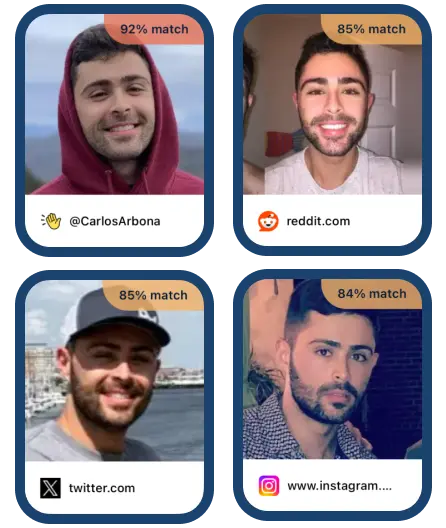
Results return likely profile matches with source links and platform context. Review the face, account details, and surrounding profile information before deciding what to do next.
Face Search vs. Other Methods
Free reverse image tools can be useful, but most are built to find matching images, not people across social media. Here is the practical difference when your goal is to search a person by photo.
| Tool | Social Media Coverage | Face Matching | Can Search Others | Privacy |
|---|---|---|---|---|
| Facial Recognition app | Built for public social profile discovery across major platforms | Face matching | Yes, where lawful and appropriate | Encrypted processing, no person is notified |
| Google Images / Lens | General web image and similar-image results | Mostly image and object matching | Limited for person discovery | Google may store searched image URLs |
| Yandex Images | General image index and visually similar images | Similar-image matching | Not built as a social profile finder | Standard search-engine workflow |
| PimEyes | Open-web face search, not a mobile social search app | Face matching | Terms focus on your own image or lawful third-party use | Web account and external checkout flow |
Why Google Images Falls Short
Google Lens is strong for objects, products, landmarks, and similar images. For finding a person, it often stops at visually similar photos or pages containing the same image rather than matching the face across social profiles.
Why Yandex Is Different
Yandex describes its image search as exact-copy and similar-image search. That can help with visual matches, but it is not a dedicated mobile workflow for social media face search or credit-based profile retrieval.
Why PimEyes Is Not the Same
PimEyes is an open-web face search tool. The Facial Recognition app focuses on a mobile app experience, social profile discovery, subscription credits, and optional credit top-ups through standard Android in-app purchases.
Person Finder by Image: What to Expect
Upload Any Photo Type
Selfies, screenshots, profile photos, group shots, cropped images, and older pictures can all work. The clearest results usually come from a visible, well-lit face, but the person finder by image is built to handle imperfect real-world photos.
What Happens During the AI Scan
The AI detects the face, maps facial landmarks, and compares the pattern against indexed public profiles. It is looking for the same person across different photos, not just the exact same file.
How to Read Your Results
Results show likely matching profiles and source links so you can compare the face, username, platform, and context. Treat matches as leads to review, not as a substitute for your own judgment.
Subscription Credits with Top-Ups
Searches use credits included with your subscription. If you need more searches, you can top up with additional credits through standard Google Play in-app purchases.
Review Results Before You Act
A face search result is useful because it gives you context: the matched profile, the platform, and enough visual detail to compare the person yourself. Use results as a starting point for verification, not as an automatic identity decision.
Learn how app credits workWho Uses Face Search to Find People by Photo?
Our people finder serves anyone who needs to locate someone online.
Social Discovery
Met someone at a conference, party, or travel destination? Find people by photo and connect without needing to exchange usernames. Try our Instagram account search for Instagram-specific lookups.
Safety & Verification
Verify a dating profile match before a first meeting, check whether a marketplace seller uses the same face elsewhere, or confirm a business contact before sharing sensitive details.
Lost Connections
Have a photo of someone you lost touch with? Search a person by photo to find old classmates, former colleagues, travel friends, or people from archived camera-roll pictures.
Profile Research
Investigate whether a public profile photo appears on multiple networks. For broader platform discovery, use our social media face search.
Image Reuse Checks
Search your own photos to see whether similar public images or copied profile pictures are being used on accounts you do not recognise.
Creator & Influencer Checks
Research public-facing creators before outreach. A person finder by image can help you connect profiles across TikTok, Instagram, Facebook, LinkedIn, and other platforms.
Start Finding People by Photo Today
Download the Facial Recognition app and discover anyone\u2019s social media presence from a single photo. Available on Android.
People Finder Success Stories
Frequently Asked Questions
How does finding people by photo work?
Upload a photo containing a face to the Facial Recognition app. Our AI maps unique facial features and compares them against billions of indexed social media profiles to find matching people.
Can I find multiple people from a single group photo?
Yes! Our AI automatically detects and separates individual faces in group photos. You can search for each person individually from the same uploaded image.
What makes this better than Google reverse image search?
Google matches images, not faces. Our technology specifically analyses facial features to find people across social media, even if they’ve never used that exact photo anywhere online.
How much does it cost to find people by photo?
The app uses a subscription-based credit system. Subscriptions include search credits, and additional credits can be purchased as top-ups through standard in-app purchases on Android. Open the app to see current plans and pricing.
Is it legal to face search someone by photo?
Face search laws vary by country and use case. Use the app only for lawful, legitimate purposes, respect privacy, and do not use results for stalking, harassment, discrimination, or decisions that require formal identity verification.
How does this compare to PimEyes or Yandex?
Yandex is a general reverse image search tool that returns exact and similar images. PimEyes is an open-web face search service with terms focused on your own image or lawful third-party use. The Facial Recognition app is positioned as a mobile-first social media face search app with subscription credits and optional credit top-ups.